# Common Errors and Debugging Tricks
# Errors
# ERROR!!! The code you are using is OLDER than the version that made these databases!
or
Cannot downgrade mod_attendance from 2020082500 to 2020072900.

* Solution:

sudo -u www-data php cfg.php --name=version --component=local_ace --set=2024060300

Or but this will not update the cache

Check the version in version.php matches the db record and update if required
    select value from mdl_config_plugins where name like 'version' and plugin like 'local_ace';
    update mdl_config_plugins set value = 2021120800 where plugin like 'local_ace' and name like 'version';
# Invalid state passed to moodle_page:set_state
So hrs later i discover that there was no issue with how I was using renderer/renderable but cuz i had called get_renderer()->header() twice in the codeflow. Now I see the error stack n it is obvious but was not so when I had started on it.
# Debugging
# Debugging Ajax or Javascript related errors
You will encounter an issue that when ajax or javascript is involved, it is difficult to get the error for an issue. You can view the errors by going to the browser's 'Web Developer Tools' -> Network -> (Select the file causing the issue for e.g. ajax_callbacks.php) -> Response
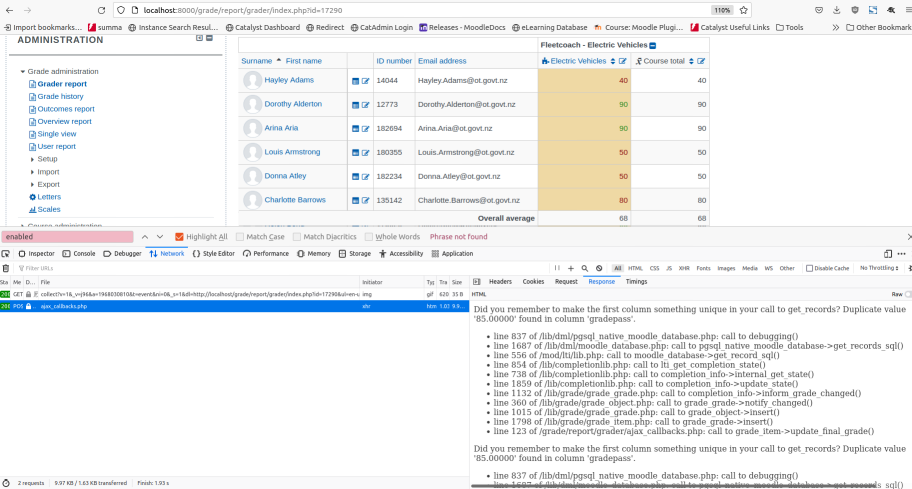
# Guidelines to debug Javascript / Ajax related errors in Moodle
disable the below settings via the GUI
yuicomboloading: false
debug: DEBUG_DEVELOPER
cachejs: false
# Debugging ways
Use error_log(print_r($this, true));
or
$errorfile= fopen('/wherever/is/appropriate', "a");
fwrite($errorfile, print_r($this, true));
fclose($errorfile);
or
error_log(print_r($this, true), 3, '/somewhere/reasonable/custom.log');
# SCORM
# Scorm with objectfs
Potential issues with adding a new SCORM package due to objectfs plugin - For e.g., if a site has approx 1000 files which it extracts and during the extraction I "think" it's asking "does this file exist" in object storage for each file and the response from object storage to say "no" is a bit slow - we get through around 400 files and then one of the files takes more than 30seconds to say "no" so we eventually time out and it fails to add the plugin.

But why does it need to ask object storage - surely that's

I think it's just the way the file api is working - it doesn't upload the file to object storage during that request. It does the upload on scheduled task
# PHP unit tests failures
# test_admin_apply_default_settings failed in test adminlib_test
core\adminlib_test::test_admin_apply_default_settings
Failed asserting that two arrays are identical.
--- Expected
+++ Actual
@@ @@
-Array &0 ()
+Array &0 (
+    'book/numbering' => '1'
+    'theme_catawesome_b/headerborder' => '0'
+    'theme_catawesome_b/slideeffect' => '0'
+    'theme_catawesome_b/coursebg' => '0'
+    'theme_catawesome_b/sectionzero' => '0'
+)

vendor/bin/phpunit lib/tests/adminlib_test.php

This usually occures in selectbox on settings page of a plugin. Check that the default value applied exists in the options given to the selectbox. And then purge cache to see the result reflected. If you are testing in docker, rebuild and then trigger tests again to see the result as otherwise the tests keeps failing